









 |
|
 |
|
 |
|
 |
|
 |
|
 |
|
 |
|
 |
|
 |
|
 |
|
 |
|
 |
|
 |
|
 |
|
 |
|
Cryptocurrency News Articles
Integrate Amazon Q Business with SharePoint (Online) using the OAuth 2.0 ROPC flow authentication method
Nov 25, 2024 at 11:59 pm
Enterprises face significant challenges accessing and utilizing the vast amounts of information scattered across organization's various systems. What if you could simply ask a question and get instant, accurate answers from your company's entire knowledge base, while accounting for an individual user's data access levels?
Enterprises face significant challenges accessing and utilizing the vast amounts of information scattered across an organization’s various systems. What if you could simply ask a question and get instant, accurate answers from your company’s entire knowledge base, while accounting for an individual user’s data access levels?
Amazon Q Business is a game changing AI assistant that’s revolutionizing how enterprises interact with their data. With Amazon Q Business, you can access relevant information through natural language conversations, drawing insights from diverse data sources within your organization, adhering to the permissions granted to your user account.
At its core, Amazon Q Business works by first indexing the content from a variety of data sources using built-in data source connectors. These connectors function as an integration layer, unifying content from diverse systems such as Salesforce, Microsoft Exchange, and SharePoint into a centralized index. This consolidated index powers the natural language processing and response generation capabilities of Amazon Q. When a user asks a question using the built-in web experience, Amazon Q Business retrieves relevant content from the index, taking into account user profiles and permissions. It then uses large language models (LLMs) to provide accurate, personalized, and well-written responses based on the consolidated data.
For a full list of Amazon Q supported data source connectors, refer to Supported connectors.
This approach is useful when you need Amazon Q Business to crawl through OneNote or if you don’t want to deal with certificates or in scenarios that require regular password rotation.
We provide a step-by-step guide for the Azure AD configuration and demonstrate how to set up the Amazon Q connector to establish this secure integration.
Solution overview
SharePoint is a web-based solution developed by Microsoft that enables organizations to collaborate, manage documents, and share information efficiently. It offers a wide range of features, including using document libraries, viewing lists, publishing pages, sharing events and links, and allowing users to make comments, making it a great tool for team collaboration and content management.
After integrating SharePoint Online with Amazon Q Business, you can ask questions using natural language about the content stored in the SharePoint sites. For example, if your organization’s human resources team manages an internal SharePoint site and maintains a list of holidays for geographical regions, you can ask, “What are the company holidays for this year?” Amazon Q Business will then list region-specific holidays based on your location (country).
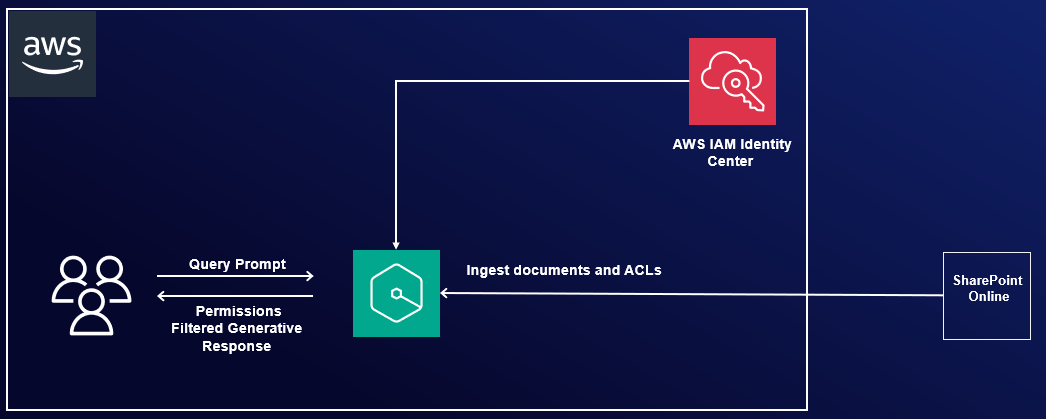
The following diagram illustrates the solution architecture. In the upcoming sections, we show you how to implement this architecture. After you integrate Amazon Q Business using the SharePoint connector, Amazon Q Business will crawl through the SharePoint content and update the index whenever content changes. Each published event, page, link, file, comment, OneNote, and attachment on the SharePoint site is treated as a document. In addition to the documents, it also crawls through access control lists (ACLs) for each document (user and group information) and stores them in the . This allows end-users to see chat responses generated only from the documents they have access to.
You can configure Azure AD using either of the following methods:
We demonstrate both methods in the following sections.
Prerequisites
To follow along, you need the following prerequisites:
Configure Azure AD using the Azure AD console
To configure Azure AD using the GUI, complete the steps in this section.
Register an Azure AD application
Complete the following steps to register an Azure AD application in the Azure AD tenant that is linked to the SharePoint Online/O365 tenant:
An application will be created. You will see a page like the following screenshot.
Now you can configure the newly registered application with Microsoft Graph and SharePoint API permissions.
When configuring permissions, you have two different options:
For option 1, install the MS Graph PowerShell SDK as a prerequisite.
Option 1: Manually allow access to specific SharePoint sites
If you choose option 1, to grant access to specific sites instead of all sites, you need to complete additional prerequisites.
Make sure you have access to another application in Microsoft Entra ID with Sites.FullControl.All application-level permissions, along with its client ID and client secret. This application won’t be used by the Amazon Q Business connector, but it’s needed to grant Sites.Selected permissions only to the application you just registered. If you don’t have access to an application with Sites.FullControl permissions, you can follow the previous steps to register a new application and grant Sites.FullControl as described in option 2. We refer to this application as SitesFullControlApp.
To configure your permissions using option 1, complete the following steps:
You will see the permissions listed as shown in the following screenshot.
After granting admin consent, your permissions should look like the following screenshot.
The output from the PowerShell script will look like the following screenshot.
This completes the steps to configure permissions for a specific set of SharePoint site collections.
Option 2: Manually allow
Disclaimer:info@kdj.com
The information provided is not trading advice. kdj.com does not assume any responsibility for any investments made based on the information provided in this article. Cryptocurrencies are highly volatile and it is highly recommended that you invest with caution after thorough research!
If you believe that the content used on this website infringes your copyright, please contact us immediately (info@kdj.com) and we will delete it promptly.
-

- Japan, XRP, and the XRP Army: A Quiet Revolution in Global Finance?
- Sep 13, 2026 at 08:05 pm
- Wall Street analyst Rob Cunningham suggests Japan's deep involvement with XRP and Ripple may be a strategic play for a global financial overhaul, while institutional adoption of XRP as collateral is gaining traction. Meanwhile, the U.S. crypto regulatory landscape faces a pivotal moment with the Clarity Act.
-
- Unconfirmed Buzz: Chainlink Whales, 10M LINK, and the 17% Correction – What's Really Going On?
- Sep 13, 2026 at 04:05 pm
- Whispers of Chainlink whales scooping up 10M LINK after a 17% dip are making waves, but the data is as murky as a New York City alley in the rain. Let's dive into the unconfirmed claims and separate fact from fiction.
-
- Cardano Price Prediction, Analysis, and Movement: Navigating Market Volatility and Future Potential
- Sep 13, 2026 at 04:05 pm
- Cardano's ADA faces key support at $0.20 amidst market volatility. Analysis reveals mixed technicals, but fundamental strengths and future developments offer long-term optimism.
-
-
-
- Ripple RLUSD Circulation Hits $2.4 Billion: A Closer Look at the Stablecoin's Trajectory
- Sep 13, 2026 at 04:05 am
- Ripple's RLUSD stablecoin circulation has reached a reported $2.4 billion, a significant milestone, though discerning its true impact requires a nuanced understanding of metrics and market dynamics.
-
-
- Reform UK's Crypto Funding: A Deep Dive into the £72M Donation and Its Ripple Effects
- Sep 13, 2026 at 03:55 am
- Reform UK has secured a colossal £72 million in crypto-linked donations, sparking debate over campaign finance and the growing influence of digital assets in British politics. This unprecedented funding reshapes the electoral landscape and intensifies regulatory scrutiny.
-
- Teucrium Inverse XRP ETF Sets October 11th Effective Date: What Investors Need to Know About the ETF Launch Date
- Sep 13, 2026 at 03:45 am
- Teucrium's inverse XRP ETF has a new proposed effective date of October 11, 2026. Here's a breakdown of what this means for investors and the broader ETF landscape.


