










![[ENG SUB]✨A Contract Wife With Many Secrets Turned The Cold General’s Heart Into True Love#drama](/uploads/2026/09/18/cryptocurrencies-news/videos/origin_6aacdd2b81574_image_500_375.webp "[ENG SUB]✨A Contract Wife With Many Secrets Turned The Cold General’s Heart Into True Love#drama")






-
 bitcoin
 $77560.422694 USD
1.38% - ethereum
$2487.453153 USD
1.65% - tether
$0.999055 USD
0.00% - bnb
$754.929766 USD
3.97% - xrp
$1.325914 USD
1.70% - usd-coin
$0.999829 USD
-0.01% - solana
$105.756375 USD
5.69% - tron
$0.335859 USD
0.15% - zcash
$1491.934575 USD
9.81% - hyperliquid
$87.784577 USD
10.62% - dogecoin
$0.084281 USD
3.81% - monero
$531.066198 USD
7.27% - chainlink
$11.802944 USD
5.34% - unus-sed-leo
$8.892769 USD
-0.44% - cardano
$0.213660 USD
7.72%











Where can I buy PancakeSwap?
Buying PancakeSwap (CAKE) involves registering on a centralized exchange (Binance, Bitget), verifying your identity, depositing funds, and placing an order. Alternatively, use Trust Wallet with PancakeSwap, requiring a BSC network switch and sufficient BNB for gas fees.
Mar 21, 2025 at 04:00 pm
Centralized exchange :
Binance :
Register an account : Go to Binance official website or download the Binance APP. When registering on the official website, click the "Register" button on the homepage, enter a valid email address or mobile phone number, and set a security password. After registration is completed, identity verification is required, which is a compliance requirement and can ensure the security of the account. Upload ID card photos or other recognized ID documents, and complete verification steps such as facial recognition according to the prompts.
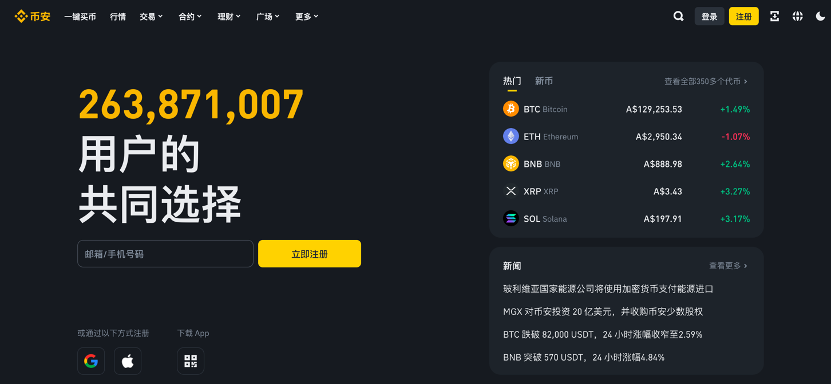
How to buy : Click "Buy Cryptocurrency" in the navigation bar at the top of Binance website. For new users, it is more direct to using a debit/credit card. On the "Buy PancakeSwap with USD" page, select PancakeSwap (CAKE) and USD from the drop-down menu, then select "Bank Card" as the payment method and click "Confirm". If you have not traded with this card before, you need to click "Add New Card", enter the card details such as card number, validity period, CVV code, etc., and then confirm. On the payment confirmation page, carefully verify the purchase amount, handling fee and other information. If you have any concerns about the price, you can click "Refresh" to get the latest quotation. After confirming that the order is correct, the page will jump to the bank's OTP transaction page and complete the payment verification according to the bank's requirements. After the verification is passed, CAKE will be deposited into your spot wallet. In addition, if you use Google Pay or Apple Pay, select it in the corresponding payment method options, and the mobile phone will automatically call the payment application and follow the prompts on the screen to complete the payment operation. At the same time, Binance supports third-party payment. You can go to the Binance FAQ page to view the available third-party payment channels in your region, select the appropriate third-party payer, and complete the purchase according to its process.
Bitget :
Account creation : Open the Bitget official website or APP, click "Register", enter your email address, select your place of residence and complete the account creation. Then carry out identity authentication, visit the identity authentication page, fill in the country information truthfully, and upload clear photos of your ID card and selfies. After the authentication is successful, a system notification will be received.
Recharge and purchase : If you purchase with a credit card/debit card, if it is a Visa or Mastercard, select the credit/debit card in the "Recharge/Buy Coins" option; if you use a Dalai Credit Card/Discovery Card, click "Quick Buy Coins"-(third party) in the navigation bar at the top to place an order. If you want to purchase with Google Pay or Apple Pay, click [Quick Buy Coins]> (third party) in the navigation bar at the top. Bitget also accepts a variety of bank transfer payment methods, such as payment of euros through iDeal and SEPA, payment of Brazilian reals by PIX, etc. These are powered by Alchemy Pay, Banxa, Mercuryo and Simplex, and select the corresponding fiat currency to place an order in the top navigation bar [Quick Buy Coin]> (Third Party). If you already have a fiat currency balance, you can deposit fiat currency funds through payment methods such as Advcash and SEPA to recharge the fiat currency. Then click [Quick Buy Coin]> (Cash Flash Redeem) in the top navigation bar to place an order to purchase PancakeSwap.
Decentralized exchange :
TP Wallet (Trust Wallet) combined with PancakeSwap :
Wallet installation and settings : Search for "TP Wallet" in the mobile app store to download and install. After the installation is complete, open the app and follow the prompts to create a new wallet. During the creation process, be sure to properly save the mnemonic and private keys, which is the key to wallet recovery and fund security. Mnemonic words are generally composed of 12 or 24 words and should be recorded in a safe environment and must not be disclosed.
Network Switching : After opening the TP wallet, the default network may be the Ethereum network. Click the network selection area of the main interface, find Binance Smart Chain (BSC) in the pop-up network list and select Switch.
Connect to PancakeSwap : Enter the official website link of PancakeSwap in the DApp browser of the TP wallet ( https://pancakeswap.financ e ). After entering the PancakeSwap homepage, click the "Connect Wallet" button and select TP Wallet from the pop-up wallet option to connect.
Purchase operation : After the connection is successful, select "Exchange" in the "Transaction" function. In the token selection interface, enter "CAKE" or its contract address (available from the official PancakeSwap channel) through the search bar to select the token accurately. After confirming the selection, enter the quantity you want to purchase. It should be noted that BSC online transactions require payment of handling fees, so there must be enough BNB in the wallet for handling fees. After entering the quantity, click "Exchange" and confirm the transaction. After the transaction is completed, if the pancake token is not displayed in the TP wallet, you can go to the "Add token" option, enter the contract address of the pancake token, and manually add it to the asset list.
Registration and Authentication :
When registering on a centralized exchange (such as Binance and Bitget), fill in the email, mobile phone number and other information strictly as required to complete the registration process. Then, follow the platform's guidelines, upload photos of valid ID documents, fill in personal information, etc. to complete identity verification.
When creating a wallet with TP wallet, carefully set the password, properly record the mnemonic and private keys, and ensure the security of information.
Funding preparation :
Legal currency recharge : When recharge with credit/debit card in a centralized exchange, enter the card number, validity period, CVV code and other information according to the recharge page prompts, enter the recharge amount and complete the payment. Use Google Pay or Apple Pay to complete the operation by following the prompts on the payment app’s interface. Bank transfers must be completed in the bank online banking or mobile banking APP according to the collection account information provided by the platform.
Cryptocurrency preparation : If you purchase through TP wallet combined with PancakeSwap, deposit enough BNB in your wallet in advance, you can withdraw to the TP wallet by transferring money from other wallets or purchasing on an exchange that supports BNB recharge.
Purchase operation :
On a centralized exchange : After completing identity verification and fund recharge, find the "Buy Coins" function portal on Binance or Bitget platform. Enter "PancakeSwap (CAKE)" in the search bar, select the corresponding trading pair, enter the purchase amount or quantity, carefully confirm the transaction price, handling fee and other details, and submit the order to complete the purchase after correctness.
On a decentralized exchange : Taking TP wallet combined with PancakeSwap as an example, after completing network switching and wallet connection, search and select CAKE on the PancakeSwap trading interface, enter the purchase quantity, and confirm the transaction. At this time, the wallet will deduct the corresponding BNB for handling fees and purchase funds. Wait for the blockchain network to confirm the transaction, and after confirmation is completed, CAKE is successfully purchased.
Disclaimer:info@kdj.com
The information provided is not trading advice. kdj.com does not assume any responsibility for any investments made based on the information provided in this article. Cryptocurrencies are highly volatile and it is highly recommended that you invest with caution after thorough research!
If you believe that the content used on this website infringes your copyright, please contact us immediately (info@kdj.com) and we will delete it promptly.






- AVAX Price Surges as Avalanche Chain Embraces Tokenized Funds and Institutional Growth
- 2026-09-18 16:50:01
- Bank of Japan's Rate Hike: Yen, Bitcoin, and the Unwinding of Carry Trades
- 2026-09-18 12:50:01
- XRP Ledger Embraces Native Lending and Transaction Bundling with Major Updates
- 2026-09-18 12:30:01
- CFTC Offers Broker Registration Relief for Passive Crypto Trading Software, Signals Broader Regulatory Shift
- 2026-09-18 12:55:01
- U.S. Tightens Grip: New Sanctions Target Iranian Crypto Exchange BitBank Amid Maritime Payment Probe
- 2026-09-18 12:45:01
- US Treasury Sanctions Iranian Exchange BitBank Over $1 Billion in Crypto Flows: A New York Take
- 2026-09-18 12:55:01
Related knowledge

What Is DAI and How Is It Different From USDT?
Sep 08,2026 at 05:00pm
Market Volatility Patterns1. Price swings exceeding 15% within a 24-hour window have occurred in over 68% of Bitcoin’s trading days since 2021. 2. Eth...

Why Can a Stablecoin Lose Its $1 Peg?
Sep 08,2026 at 02:00am
Reserve Composition and Transparency Gaps1. Many stablecoins claim to be fully backed by cash or short-duration US Treasuries, yet reserve disclosures...

What Is Self-Custody in Crypto and Why Does It Matter?
Sep 10,2026 at 04:19am
Definition and Core Mechanics1. Self-custody refers to the practice where individuals retain full control over their private keys without delegating t...
Custodial vs Non-Custodial Wallets: What’s the Difference?
Sep 17,2026 at 03:19am
Custodial Wallets Defined1. A custodial wallet is a digital asset storage solution where a third-party service provider holds and manages users’ priva...

What Is a Multisig Wallet and When Is It Useful?
Sep 12,2026 at 02:20pm
Definition and Core Architecture1. A multisig wallet is a cryptographic construct that requires multiple private keys to authorize a single blockchain...
Bitcoin vs Lightning Network: What’s the Difference?
Sep 13,2026 at 03:40pm
Core Architecture and Transaction Model1. Bitcoin operates on a single-layer, permissionless blockchain where every transaction is cryptographically v...
What Is DAI and How Is It Different From USDT?
Sep 08,2026 at 05:00pm
Market Volatility Patterns1. Price swings exceeding 15% within a 24-hour window have occurred in over 68% of Bitcoin’s trading days since 2021. 2. Eth...
Why Can a Stablecoin Lose Its $1 Peg?
Sep 08,2026 at 02:00am
Reserve Composition and Transparency Gaps1. Many stablecoins claim to be fully backed by cash or short-duration US Treasuries, yet reserve disclosures...
What Is Self-Custody in Crypto and Why Does It Matter?
Sep 10,2026 at 04:19am
Definition and Core Mechanics1. Self-custody refers to the practice where individuals retain full control over their private keys without delegating t...
Custodial vs Non-Custodial Wallets: What’s the Difference?
Sep 17,2026 at 03:19am
Custodial Wallets Defined1. A custodial wallet is a digital asset storage solution where a third-party service provider holds and manages users’ priva...
What Is a Multisig Wallet and When Is It Useful?
Sep 12,2026 at 02:20pm
Definition and Core Architecture1. A multisig wallet is a cryptographic construct that requires multiple private keys to authorize a single blockchain...
Bitcoin vs Lightning Network: What’s the Difference?
Sep 13,2026 at 03:40pm
Core Architecture and Transaction Model1. Bitcoin operates on a single-layer, permissionless blockchain where every transaction is cryptographically v...
See all articles


